
llmops
Self-Hosting LLMs in Production: The vLLM + KubeAI Stack
Contents
Deploying a large language model is not the hard part. Deploying one in a way that is safe to operate, cost-effective to scale, and straightforward to reason about under load is where most teams run into trouble.
This walks through an architecture for running self-hosted LLM inference in production, using vLLM as the inference engine and KubeAI for model lifecycle and operational concerns. I have built variants of this stack for teams that could not use a managed API, and the version here is the one I would reach for again.
Rather than a step-by-step tutorial, the intent here is to explain the tradeoffs that led to this architecture and where it fits, and where it does not fit, compared to alternatives.
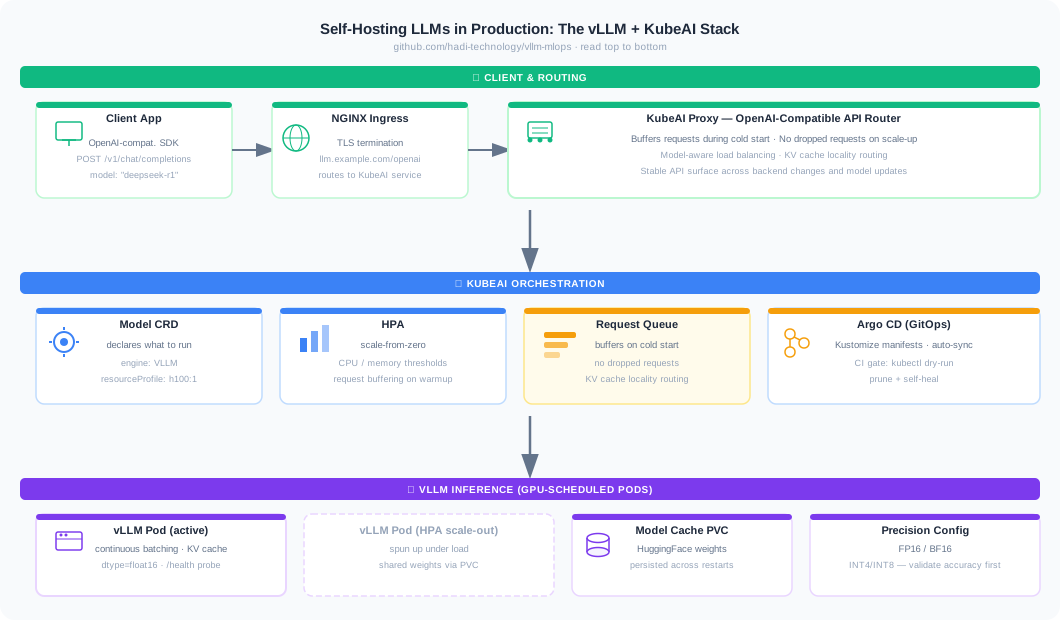
The Core Operational Problem with Self-Hosted LLM Inference
Running vLLM directly on Kubernetes is not complicated. You deploy a pod with GPU resources, expose a port, and route traffic to it. The problems that emerge are operational:
- How do you handle cold start? A vLLM pod serving DeepSeek-R1 can take several minutes to initialize. Traffic routed to a cold pod will either fail or stack up in ways that are hard to recover from.
- How do you scale from zero without dropping requests during the ramp-up window?
- How do you maintain KV cache locality across replicas? Stateful LLM backends have characteristics that standard round-robin load balancing is not designed for.
- How do you present a stable, OpenAI-compatible API surface that survives backend changes, scaling events, and model version updates?
Deploying vLLM pods directly answers none of these questions. You end up building an operations layer on top of raw Kubernetes primitives, and that layer tends to grow in complexity over time as each operational problem gets patched individually.
KubeAI sits one layer above vLLM and handles these concerns natively. The tradeoff is a dependency on an additional platform component. Whether that tradeoff is worth it depends on the operational context, which we will get to.
The first time I ran a scale-from-zero DeepSeek deployment without request buffering, the opening burst of traffic hit a cold pod, the requests neither queued nor failed cleanly, and the retry storm that followed kept every subsequent pod too saturated to finish initializing. The fix was not more replicas. It was buffering at the proxy so the cold-start window stopped being a failure window.
What KubeAI Actually Does
KubeAI introduces a Model custom resource that describes what to run rather than how to deploy it:
apiVersion: kubeai.org/v1
kind: Model
metadata:
  name: deepseek-r1
spec:
  features:
    - TextGeneration
  url: hf://deepseek-ai/DeepSeek-R1
  engine: VLLM
  args:
    - --dtype=float16
    - --max-model-len=32768
    - --max-num-batched-tokens=8192
    - --gpu-memory-utilization=0.90
    - --disable-log-requests
  resourceProfile: nvidia-gpu-h100:1
The model name deepseek-r1 becomes the identifier used in OpenAI-compatible requests. KubeAI owns the rest: pulling the model, caching it, launching vLLM backend pods, buffering requests during initialization, and routing traffic once the backend is ready.
The request flow through the stack:
- Traffic arrives at the KubeAI OpenAI-compatible proxy
- KubeAI selects or spins up a backend for the target model
- Requests are queued while the backend initializes, rather than being dropped or returning errors
- The request is forwarded to vLLM
- Responses stream back through the proxy
The queuing behavior during cold start is the most practically important property KubeAI provides. It is the difference between a scale-from-zero deployment that works reliably and one that causes cascading failures when the first wave of traffic hits a cold pod.
Precision and GPU Sizing: Decisions That Compound
For a model like DeepSeek-R1, these are not configuration details. They are architectural decisions that affect cost, latency, and reliability.
Precision. FP16 is a reliable default on A100 and H100-class hardware. BF16 can be preferable on some newer hardware due to its wider dynamic range and better numerical stability for certain workloads. The practical difference in most serving scenarios is small, but it matters when debugging unexpected inference behavior. 8-bit and 4-bit quantization can meaningfully reduce VRAM pressure (running a 70B model at INT4 is the difference between one H100 and four), but quantization introduces accuracy tradeoffs that need to be validated carefully against your specific use case before deploying to production.
GPU sizing. The resourceProfile field in the Model spec makes GPU requirements explicit and decoupled from model configuration. In direct vLLM deployments, GPU sizing often ends up embedded in Deployment specs alongside model configuration, which makes it easy to change one without reviewing the other. Keeping the GPU profile as a named, versioned resource makes changes reviewable.
Batching. The --max-num-batched-tokens parameter controls continuous batching behavior, which is one of vLLM’s core performance advantages over naive request-by-request inference. Getting this right requires understanding the request latency profile you are targeting and the typical prompt/completion length distribution for your workload. Too conservative and you leave GPU utilization on the table. Too aggressive and tail latency suffers.
When This Architecture Makes Sense and When It Does Not
This stack is a good fit when:
- You need to run self-hosted inference for data residency, cost, or customization reasons and cannot use a managed API provider
- You are serving multiple models that need independent lifecycle management, where model A and model B should be able to update, scale, and fail independently
- You need scale-from-zero behavior to manage GPU costs, but cannot afford to drop requests during the warmup window
- You want a stable OpenAI-compatible API surface that allows client code to be model-agnostic
It is not the right fit when:
- A managed API provider (OpenAI, Anthropic, Vertex AI) meets your requirements, since managed endpoints abstract away all of this complexity and the operational cost is lower at moderate scale
- You are prototyping or running experiments where operational overhead is more costly than GPU spend
- You are serving a model that fits comfortably in CPU memory or on a single GPU with no scaling requirements, in which case deploying KubeAI adds unnecessary overhead
In client work, the decision to go self-hosted rather than managed typically comes down to one of three things: a hard data residency requirement, a model that is not available through managed APIs, or a cost calculation at high enough inference volume that managed API pricing becomes prohibitive. My default for teams under roughly ten engineers is to stay on a managed API until one of those reasons forces the move, because the operational surface here is larger than it looks on the diagram.
Exposing the API and Multi-Tenant Considerations
The KubeAI service provides an OpenAI-compatible API internally at http://kubeai/openai/v1. Exposing it externally involves a standard Kubernetes Ingress:
apiVersion: networking.k8s.io/v1
kind: Ingress
metadata:
  name: kubeai-ingress
spec:
  rules:
    - host: llm.example.com
      http:
        paths:
          - path: /openai
            pathType: Prefix
            backend:
              service:
                name: kubeai
                port:
                  number: 80
In multi-tenant deployments, which is the typical case for teams like Joinable where the inference infrastructure serves multiple downstream applications, this is where authentication and per-tenant rate limiting need to be layered in. KubeAI does not provide tenant isolation natively. That sits in the API gateway layer in front of it. The clean separation of concerns here is an advantage: the inference infrastructure does not need to carry application-level concerns about who is calling it.
Observability: What to Instrument and Why
A self-hosted LLM deployment without proper observability is one incident away from an extended outage. The metrics that matter most in practice are not the generic Kubernetes resource metrics. They are inference-specific signals:
Token throughput. Are you fully utilizing the GPU’s batching capacity, or are requests being processed one at a time? This is the difference between a deployment that is cost-efficient and one that is burning GPU budget without proportional output.
Queue depth. How many requests are waiting for a backend? Sustained queue depth is an early warning of capacity exhaustion, visible well before latency metrics deteriorate.
Time-to-first-token (TTFT) and inter-token latency. These have different sensitivity profiles for different applications. A chatbot application cares more about TTFT. A batch processing pipeline cares more about total throughput. Knowing which one matters for your use case determines where to optimize.
Cold start frequency. If you have scale-from-zero enabled, tracking how often pods are spinning up from zero tells you whether the cost savings from idle scale-down are worth the latency impact.
The vLLM /metrics endpoint exposes Prometheus-compatible metrics. The KubeAI ServiceMonitor wires those into Prometheus scraping. From there, the standard observability stack (Prometheus, Grafana) gives you the visibility you need.
Operational Cost as a Design Input
One framing that tends to change how these decisions get made: GPU time is expensive, and most teams underestimate how much of their GPU spend goes to idle capacity rather than actual inference. I have seen teams discover that two-thirds of their GPU budget was burning on pods sitting idle between traffic bursts.
Scale-from-zero with request buffering is not just a nice operational feature. For workloads with bursty or time-of-day traffic patterns, it can meaningfully reduce the cost of running the infrastructure. The cost of the cold start latency (a few minutes) has to be weighed against the cost of keeping a GPU pod warm during idle periods. For most non-latency-critical workloads, scale-from-zero wins.
The precision decision is also a cost decision. A model that can run at INT4 rather than FP16 may fit on a smaller GPU class, which changes the instance pricing significantly. Validating quantization accuracy early in the project is worth the investment.
Closing Thoughts
The combination of vLLM and KubeAI is not the simplest possible way to self-host an LLM. It is the simplest way to self-host an LLM that is safe to operate at production scale, where cold starts, traffic spikes, model updates, and cost management are daily concerns rather than edge cases.
Code: github.com/hadi-technology/vllm-mlops
Muntazir Fadhel builds production AI and ML infrastructure. He is the founder of HADI Technology. Technical Profile · Get in Touch