
llmops
Self-Hosting LLMs in Production: The vLLM + KubeAI Stack
Contents
Deploying a large language model is not the hard part. Deploying one in a way that is safe to operate, cost-effective to scale, and straightforward to reason about under load is where most teams run into trouble.
This walks through an architecture for running self-hosted LLM inference in production, using vLLM as the inference engine and KubeAI for model lifecycle and operational concerns. I have built variants of this stack for teams that could not use a managed API, and the version here is the one I would reach for again.
Rather than a step-by-step tutorial, the intent here is to explain the tradeoffs that led to this architecture and where it fits, and where it does not fit, compared to alternatives.
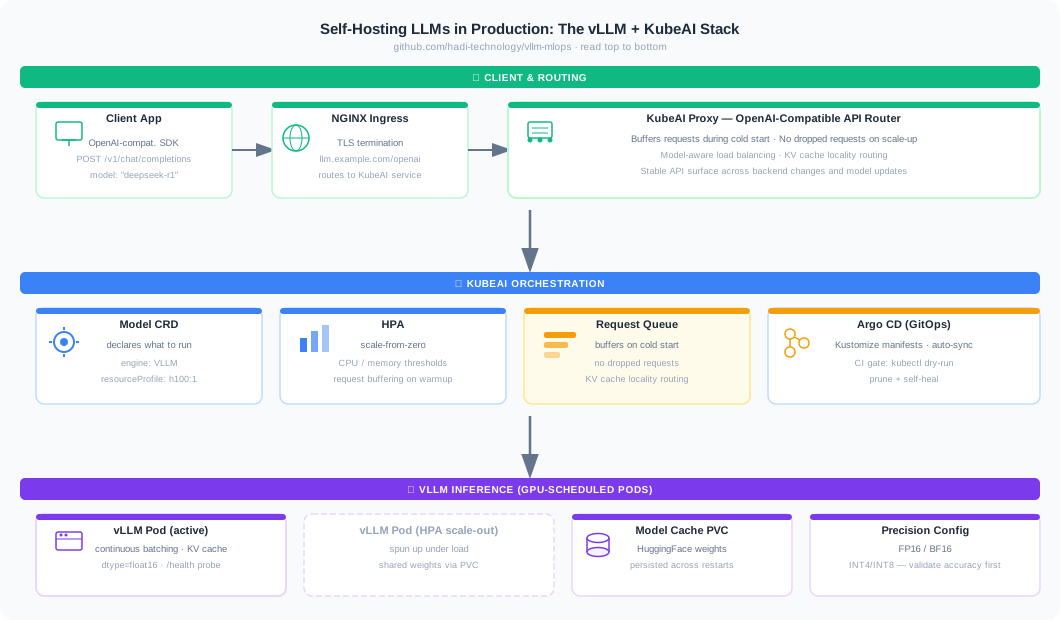
The Core Operational Problem with Self-Hosted LLM Inference
Running vLLM directly on Kubernetes is not complicated. You deploy a pod with GPU resources, expose a port, and route traffic to it. The problems that emerge are operational:
- How do you handle cold start? A vLLM pod serving a 70B model can take several minutes to initialize. Traffic routed to a cold pod will either fail or stack up in ways that are hard to recover from.
- How do you scale from zero without dropping requests during the ramp-up window?
- How do you maintain KV cache locality across replicas? Stateful LLM backends have characteristics that standard round-robin load balancing is not designed for.
- How do you present a stable, OpenAI-compatible API surface that survives backend changes, scaling events, and model version updates?
Deploying vLLM pods directly answers none of these questions. You end up building an operations layer on top of raw Kubernetes primitives, and that layer tends to grow in complexity over time as each operational problem gets patched individually.
KubeAI sits one layer above vLLM and handles these concerns natively. The tradeoff is a dependency on an additional platform component. Whether that tradeoff is worth it depends on the operational context, which we will get to.
What KubeAI Actually Does
KubeAI introduces a Model custom resource that describes what to run rather than how to deploy it:
apiVersion: kubeai.org/v1
kind: Model
metadata:
  name: llama-3.3-70b
spec:
  features:
    - TextGeneration
  url: hf://RedHatAI/Llama-3.3-70B-Instruct-FP8-dynamic
  engine: VLLM
  args:
    - --tensor-parallel-size=2
    - --max-model-len=32768
    - --max-num-batched-tokens=8192
    - --kv-cache-dtype=fp8
    - --enable-prefix-caching
    - --gpu-memory-utilization=0.90
  resourceProfile: nvidia-gpu-h100:2
  minReplicas: 1
  maxReplicas: 4
  targetRequests: 8
  loadBalancing:
    strategy: PrefixHash
This runs Llama 3.3 70B Instruct on a single node of eight H100s. At FP8 the weights take about 70 GB, so each replica fits on two GPUs with room left for KV cache, and the node holds up to four replicas. For workloads with long prompts, such as retrieval-heavy assistants, four smaller replicas beat one replica spread across all eight GPUs: they serve requests in parallel, and the FP8 KV cache doubles how many long prompts fit in memory. targetRequests: 8 tells KubeAI to add a replica once each one averages eight requests in flight, well below the default of 100, because processing long prompts saturates a replica long before that. minReplicas: 1 keeps one replica warm, since a cold 70B start takes minutes.
The model name llama-3.3-70b becomes the identifier used in OpenAI-compatible requests. KubeAI owns the rest: pulling the model, caching it, launching vLLM backend pods, buffering requests during initialization, and routing traffic once the backend is ready.
The request flow through the stack:
- Traffic arrives at the KubeAI OpenAI-compatible proxy
- KubeAI selects or spins up a backend for the target model
- Requests are queued while the backend initializes, rather than being dropped or returning errors
- The request is forwarded to vLLM
- Responses stream back through the proxy
The queuing behavior is the most practically important property KubeAI provides. A new vLLM pod is cold whenever KubeAI adds a replica under load, rolls out a model update, replaces a crashed pod, or starts a model from zero, and each start takes minutes. Without buffering, the requests that arrive in that window fail or pile up in ways that are hard to recover from. With it, they wait until the pod is ready.
Keeping Conversations on the Same Replica
LLM requests are stateless. vLLM keeps no record of a conversation, so on every turn the client sends everything again: the system prompt, any retrieved documents, the earlier questions and answers, and the new question. Turn three of a conversation can easily resend 25,000 tokens, most of which the model already read on turn two.
Reading those tokens is the expensive part. For every token in the prompt, the model computes intermediate values called keys and values, and vLLM holds them in GPU memory in the KV cache. With prefix caching enabled, vLLM keeps them after a request finishes. If a later request starts with exactly the same tokens, vLLM reuses that work and only processes what is new. For a follow-up question, that can cut time to first token from over a second to a fraction of one.
Each replica, however, has its own KV cache, and that cache is what makes the backends stateful even though the requests are not. Behind a standard Kubernetes Service, requests land on an essentially random pod, so the turns of one conversation scatter across replicas and the cache hit rate falls as you add replicas. Every answer is still correct. It is just slower and more expensive than it needs to be.
KubeAI handles this with its PrefixHash load balancing strategy, the loadBalancing block in the Model above. The proxy hashes the first 100 characters of the first user message onto a consistent hash ring, where each replica holds 256 positions. Every turn of a conversation shares that first message, so every turn lands on the same replica. If that replica is running above 125% of the average load, the request moves to the next replica on the ring instead of queueing. When KubeAI adds or removes a replica, only the conversations near that replica’s positions move, and everyone else keeps their cache. The default strategy, LeastLoad, balances load but ignores the cache, so this has to be switched on.
KubeAI predicts where a conversation’s cache lives without ever looking inside vLLM, so the routing only works if the application builds its prompts with it in mind:
- Put shared instructions in the system message, which KubeAI skips when hashing, and start the first user message with the user’s actual question. If every first user message opens with the same template text, every request hashes to the same replica.
- Keep earlier messages identical from turn to turn and add newly retrieved documents at the end. The cache only matches from the start of the prompt, so rebuilding or reordering earlier content throws the match away.
- Keep timestamps and other per-request values out of the start of the prompt for the same reason.
Precision and GPU Sizing: Decisions That Compound
For a 70B model, these are not configuration details. They are architectural decisions that affect cost, latency, and reliability.
Precision. BF16 is the safe default on A100 and H100-class hardware, and it is the format most open models ship in. FP16 also works and the practical difference in most serving scenarios is small, but its narrower range can overflow on models trained in BF16, which matters when debugging unexpected inference behavior. Below 16 bits, FP8 is the first thing to try on H100-class GPUs: it halves weight memory with little accuracy loss on most models. 4-bit quantization goes further (a 70B model at INT4 fits on one H100, where FP16 needs two to four once you leave room for KV cache), but every step down introduces accuracy tradeoffs that need to be validated carefully against your specific use case before deploying to production.
GPU sizing. The resourceProfile field in the Model spec makes GPU requirements explicit and decoupled from model configuration. In direct vLLM deployments, GPU sizing often ends up embedded in Deployment specs alongside model configuration, which makes it easy to change one without reviewing the other. Keeping the GPU profile as a named, versioned resource makes changes reviewable.
Batching. The --max-num-batched-tokens parameter controls continuous batching behavior, which is one of vLLM’s core performance advantages over naive request-by-request inference. Getting this right requires understanding the request latency profile you are targeting and the typical prompt/completion length distribution for your workload. Too conservative and you leave GPU utilization on the table. Too aggressive and tail latency suffers.
When This Architecture Makes Sense and When It Does Not
This stack is a good fit when:
- You need to run self-hosted inference for data residency, cost, or customization reasons and cannot use a managed API provider
- You are serving multiple models that need independent lifecycle management, where model A and model B should be able to update, scale, and fail independently
- You serve several models that each see only occasional traffic, so they can scale to zero and share a pool of GPUs without dropping the requests that arrive while one starts up
- You want a stable OpenAI-compatible API surface that allows client code to be model-agnostic
It is not the right fit when:
- A managed API provider (OpenAI, Anthropic, Vertex AI) meets your requirements, since managed endpoints abstract away all of this complexity and the operational cost is lower at moderate scale
- You are prototyping or running experiments where operational overhead is more costly than GPU spend
- You are serving a model that fits comfortably in CPU memory or on a single GPU with no scaling requirements, in which case deploying KubeAI adds unnecessary overhead
In client work, the decision to go self-hosted rather than managed typically comes down to one of three things: a hard data residency requirement, a model that is not available through managed APIs, or a cost calculation at high enough inference volume that managed API pricing becomes prohibitive. My default for teams under roughly ten engineers is to stay on a managed API until one of those reasons forces the move, because the operational surface here is larger than it looks on the diagram.
Exposing the API and Multi-Tenant Considerations
The KubeAI service provides an OpenAI-compatible API internally at http://kubeai/openai/v1. Exposing it externally involves a standard Kubernetes Ingress:
apiVersion: networking.k8s.io/v1
kind: Ingress
metadata:
  name: kubeai-ingress
  annotations:
    nginx.ingress.kubernetes.io/proxy-buffering: "off"
    nginx.ingress.kubernetes.io/proxy-read-timeout: "600"
    nginx.ingress.kubernetes.io/proxy-send-timeout: "600"
spec:
  rules:
    - host: llm.example.com
      http:
        paths:
          - path: /openai
            pathType: Prefix
            backend:
              service:
                name: kubeai
                port:
                  number: 80
The annotations assume ingress-nginx. They turn off response buffering so streamed tokens reach the client as they are generated, and raise the timeouts so long answers are not cut off at the default of 60 seconds.
In multi-tenant deployments, which is the typical case for teams like Joinable where the inference infrastructure serves multiple downstream applications, this is where authentication and per-tenant rate limiting need to be layered in. KubeAI does not provide tenant isolation natively. That sits in the API gateway layer in front of it. The clean separation of concerns here is an advantage: the inference infrastructure does not need to carry application-level concerns about who is calling it.
Observability: What to Instrument and Why
A self-hosted LLM deployment without proper observability is one incident away from an extended outage. The metrics that matter most in practice are not the generic Kubernetes resource metrics. They are inference-specific signals:
Token throughput. Are you fully utilizing the GPU’s batching capacity, or are requests being processed one at a time? This is the difference between a deployment that is cost-efficient and one that is burning GPU budget without proportional output.
Queue depth. How many requests are waiting for a backend? Sustained queue depth is an early warning of capacity exhaustion, visible well before latency metrics deteriorate.
Time-to-first-token (TTFT) and inter-token latency. These have different sensitivity profiles for different applications. A chatbot application cares more about TTFT. A batch processing pipeline cares more about total throughput. Knowing which one matters for your use case determines where to optimize.
Cold start frequency. If you have scale-from-zero enabled, tracking how often pods are spinning up from zero tells you whether the cost savings from idle scale-down are worth the latency impact.
Prefix cache hit rate. The share of prompt tokens served from the KV cache, vllm:prefix_cache_hits divided by vllm:prefix_cache_queries. A drop after scaling out, or a rate that stays low with PrefixHash enabled, usually means the application is changing the start of its prompts between turns.
The vLLM /metrics endpoint exposes Prometheus-compatible metrics. The KubeAI Helm chart ships a PodMonitor for the vLLM pods (off by default, enabled with metrics.prometheusOperator.vLLMPodMonitor.enabled) that wires those into Prometheus scraping. From there, the standard observability stack (Prometheus, Grafana) gives you the visibility you need.
Operational Cost as a Design Input
One framing that tends to change how these decisions get made: GPU time is expensive, and most teams underestimate how much of their GPU spend goes to idle capacity rather than actual inference. I have seen teams discover that two-thirds of their GPU budget was burning on pods sitting idle between traffic bursts.
For the main interactive model, the answer is usually to keep at least one replica warm, since nobody accepts a multi-minute wait on the first question of the morning. If traffic follows the workday, a scheduled job that raises minReplicas before people arrive and lowers it at night captures most of the savings. Scale-from-zero pays off elsewhere: in the long tail of occasionally used models, such as team fine-tunes or models under evaluation, and in batch work where nobody is waiting on the answer. Either way, the savings are only real if the freed GPUs run other work or the node itself is removed. On hardware you own, an idle GPU costs the same whether a replica is running on it or not.
The precision decision is also a cost decision. A model that can run at INT4 rather than FP16 may fit on a smaller GPU class, which changes the instance pricing significantly. Validating quantization accuracy early in the project is worth the investment.
Closing Thoughts
The combination of vLLM and KubeAI is not the simplest possible way to self-host an LLM. It is the simplest way to self-host an LLM that is safe to operate at production scale, where cold starts, traffic spikes, model updates, and cost management are daily concerns rather than edge cases.
Code: github.com/hadi-technology/vllm-mlops
Muntazir Fadhel builds production AI and ML infrastructure. He is the founder of HADI Technology. Technical Profile · Get in Touch